
Master Sidechain Compression Tricks used by pros. Discover 12 advanced, essential secrets to achieve perfect dynamic mixing without the noticeable pumping effect. Transform your bass and kick now!
Introduction (Sidechain Compression Guide)
The rhythmic pumping effect of sidechain compression became a sonic signature for genres like Electro House and Trance in the 2000s. However, today, overly aggressive sidechaining is often viewed as amateur, messy, and lazy. A professional mix requires the dynamic control that sidechain provides—namely, clearing space—without the audible side effect of constant, distracting volume oscillation.
The Hook: Mastering Sidechain Compression Tricks is the ultimate technical test for any elite mixer. It means achieving perfect clarity and dynamic separation between competing elements.
The Value Proposition: This Sidechain Compression guide provides 12 advanced, essential secrets that professional audio engineers use to achieve dynamic mixing control in everything from EDM to film scoring. You will learn to use sidechain compression as a transparent tool to solve frequency masking, guaranteeing your low-end is punchy and your mix breathes, all while keeping the pumping sound out of the mix.
H2: Mastering Sidechain Compression Dynamics Fundamentals: Beyond the Kick-Bass
To use sidechain as a transparent tool, you must first master the technical setup. Mastering Sidechain Dynamics is about control over the compressor’s reaction time and trigger source.
Sidechain vs. Parallel Compression: When to Use Each
- Sidechain Compression: An external signal controls the compression on a target track. Its primary use is dynamic clearance (e.g., bass ducks when the kick hits).
- Parallel Compression (New York Compression): Uses a blend of an unprocessed and a heavily compressed version of the same signal. Its primary use is harmonic thickening and increasing perceived loudness.
Never use parallel compression for bass-kick ducking; it will only muddy the mix further.
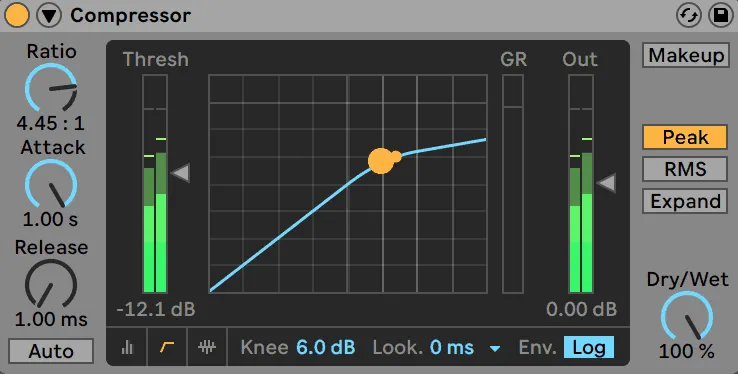
Setting Attack and Release to Avoid the Pumping Effect
The unwanted pumping is caused by an attack and release setting that is too slow, allowing the entire rhythmic pattern to be heard.
- Attack: Set to 0ms (instantaneous). This ensures the target signal (e.g., bass) ducks immediately when the kick hits, preventing phase cancellation.
- Release: Set to sync with the track tempo (often between 50ms and 150ms). Use the tempo of the track to ensure the release finishes just before the next beat, allowing the bass to return naturally.
Understanding the Importance of the SC Key Filter
Most professional compressors have a sidechain EQ filter (or high-pass filter) on the key input. This filter prevents the target track from reacting to frequencies you don’t care about. For kick/bass sidechaining, set the filter to ignore the high frequencies of the kick. Only the low-end, punchy part of the kick will trigger the compression, making the entire effect far more subtle and transparent.
H2: Trick 1: Transparent Kick and Bass Sidechain Compression
This is the foundational trick, but pros execute it with surgical precision.
Using EQ to Trigger Only the Kick’s Low-End
Instead of sending the full kick signal to the sidechain input, use a pre-compression EQ on the kick channel to boost the 50-80 Hz range dramatically and filter out the click (high-end). This sends a frequency-specific trigger signal. The result is that the bass only ducks when the sub-bass of the kick hits, leaving the midrange clarity of the bass untouched.
Adjusting Ratio and Threshold for Subtlety
To achieve a transparent Kick and Bass Sidechain, use an extremely high ratio (10:1 or higher) but a very high threshold. This ensures that the bass only ducks when the kick hits its peak, creating fast, dramatic, but short-lived dynamic changes. For a subtle clean-up, use a lower ratio (3:1) and a very low threshold to keep the effect constant but gentle.
The Power of Kick and Bass Sidechain in Mono
Always check your kick and bass sidechain compression relationship in mono. Phase cancellation and mudding are most audible in mono, and subtle sidechaining often fixes these issues instantly. If your low-end sounds tight in mono, it will sound massive in stereo.
H2: Trick 2: Vocal Ducking Against Dialogue/Music
Sidechain compression isn’t just rhythmic; it’s essential for creating hierarchy in frequency-masking scenarios, a key element of Dynamic Mixing Techniques.
Sidechaining Music to Dialogue for Podcasts/Video
In audio-for-video, send the dialogue track to sidechain the background music or score. This makes the music drop in volume only when the speaker talks, ensuring clarity and an effortless listening experience for the audience. The attack should be instantaneous, and the release should be fast (100ms) but not abrupt.
Using Vocals to Slightly Duck Reverb Returns
A dry vocal sits upfront, but the reverb tail can push it back. Send the dry vocal to sidechain the reverb and delay returns. The reverb is slightly ducked when the vocal is present, making the vocal clear, but the reverb returns immediately after the word finishes, creating space and depth. This is a subtle yet crucial Sidechain Compression Tricks for vocal clarity.
Volume Ducking Automation for Hyper-Pop Vocal Chops
For extreme rhythmic effects on short vocal chops (often found in hyper-pop or future bass), use a rhythmic MIDI trigger (a silent 16th-note pattern) to sidechain compression the vocal. This forces the vocal to duck in and out in time with the beat, turning it into a rhythmic texture. This is a form of Volume Ducking Automation achieved via external compression.
H2: Trick 3: Creative Gating and Expander Sidechain
Sidechain can trigger more than just a compressor; it can trigger gates and expanders for unique sound design.
Sidechaining Noise Gates for Rhythmic Textures
Send a rhythmic source (like a high-hat loop) to the sidechain compression input of a noise gate placed on a sustained sound (like a pad or ambient wash). The pad will only be heard when the high-hats play, turning the ambient sound into a synced, rhythmic texture. This is an incredible source of unique, sequenced sound design.
Using Expansion (Inverted Sidechain) for Emphasis
An expander is the opposite of a compressor. You can use sidechain compression with an expander so that when the external signal hits the threshold, the target signal gets louder. This is useful if you want to emphasize a sustained element slightly after a loud transient, creating a dynamic punch without peak distortion.
Gating Delay Throws to Clean Up the Mix Tail
If you have a long, loud delay on a vocal or synth, use a noise gate on the delay return, sidechained by the dry vocal. When the dry vocal is playing, the gate is open (you hear the delay). When the vocal stops, the gate quickly closes, preventing the delay from cluttering the mix. The gate’s action is governed by the source signal.
H2: Trick 4: The Transient-Shaping Sidechain
This trick uses the sidechain input to gain granular control over the attack and decay of layered drums.
Sidechaining Snares to Snare Reverb for Clarity
Similar to the vocal reverb trick, send the dry snare hit to sidechain the reverb return on the snare. This ensures the dry snare transient cuts through clearly, and the reverb only blooms after the initial crack, improving transient definition.
Using the Key Input to Emphasize Drum Transients
To make a clap stand out against a snare, sidechain the clap against the snare. Use an extremely fast attack (0ms) and a super-fast release (10-30ms). The clap is momentarily dipped right as the snare hits and instantly returns, giving the snare priority and reinforcing its transient without changing the overall level of the clap track.
Sidechain Compression Tricks for Drum Layering
When layering multiple drums (e.g., a short, snappy top snare and a long, resonant bottom snare), sidechain the longer-decaying drum against the transient of the shorter one. This ensures their transients don’t overlap and phase cancel, guaranteeing punch. This is vital in genres that use heavily layered drums, such as trap mixing advanced techniques.
H2: Trick 5: Mid-Side Sidechain Techniques
This is one of the most powerful Advanced Sidechain Techniques for controlling stereo width.
Sidechaining the Mid Channel of a Pad Only to the Kick
Use a Mid-Side plugin on a wide background pad. Route the pad’s Mid channel (the mono information) to a sidechain compressor triggered by the kick. Leave the Side channel (the stereo information) untouched. The mono center of the pad ducks, but the stereo width remains intact, preserving the overall spatial feel of the mix.
Protecting the Stereo Width by Avoiding Wide SC
Aggressive sidechaining on a wide stereo bus can narrow the perceived stereo image. By using the Mid-Side trick, you localize the dynamic movement to the mono core, ensuring the wide elements remain wide when the kick hits.
Advanced Sidechain Techniques for Stereo Imaging
Try sidechaining a wide stereo delay return (Side channel only) against the dry vocal (Mid channel). When the Mid vocal is present, the Side delay is ducked, keeping the center clear. When the vocal pauses, the delay blooms, making the mix sound much wider and cleaner.
H2: Trick 6-12: Advanced Sidechain Applications (List Section)
Beyond the fundamentals, these tricks provide creative problem-solving and unique sound design possibilities.
Trick 6: Sidechaining Guitar to Snare
- Source: Snare Drum
- Target: Rhythm Guitar Track
- Goal: To give the snare transient complete dominance over the guitar track, especially during busy rhythmic passages. Use a very short release.
Trick 7: Sidechaining Hi-Hats to Vocals
- Source: Dry Vocal Track
- Target: Hi-Hats/Shakers Bus
- Goal: To slightly dip the hi-hats when the vocal is present, reducing high-frequency masking without noticeable volume dips, as the ear focuses on the vocal.
Trick 8: Sidechaining Reverb/Delay Tails to Tempo
- Source: Silent MIDI rhythm (e.g., quarter notes)
- Target: Reverb or Delay Return
- Goal: To create a dynamic, rhythmic reverb tail that swells and dips in time with the track tempo, rather than the source material.
Trick 9: Sidechaining Pad to Another Pad (Layering)
- Source: Main Pad Layer
- Target: Sub-Pad Layer
- Goal: To ensure the main melodic layer always has priority. The sub-pad only fills the harmonic space around the main pad, preventing frequency overlap.
Trick 10: Parallel Sidechain Compression
- Source: Kick Drum
- Target: The Wet (compressed) track of a Parallel Compression Setup on the Bass.
- Goal: The clean (dry) bass track is untouched, while the distorted, harmonically rich wet track is sidechained, preserving the low-end dynamics while still adding rhythmic movement to the harmonics.
Trick 11: Multiband Sidechaining for Specific Frequencies
- Source: Kick Drum
- Target: Bass track (Multiband Compressor)
- Goal: The ultimate method for Sidechain Without Pumping Effect. Only the specific low-mid band of the bass (e.g., 100-200 Hz) that clashes with the kick is sidechained, leaving all other frequencies untouched for transparent dynamic control.
Trick 12: Using a Silent Trigger Source (Ghost Kick)
- Source: A muted MIDI/Audio track containing only the rhythmic pattern (often a click or a muted sine wave)
- Target: The bass or synth pad.
- Goal: To perfectly trigger the sidechain rhythm without the volume, tone, or timing of the actual kick drum affecting the dynamic movement. Use this when the actual kick drum is too complex or non-standard.
H2: Sidechain Without Pumping Effect: Alternatives and Best Practices
Achieving the goal of Sidechain Without Pumping Effect often requires looking beyond the compressor.
Comparing SC to Manual Volume Ducking Automation
For acoustic genres or simple arrangements, Volume Ducking Automation (drawing volume dips manually in the DAW) is the best alternative. It offers ultimate control over the shape and timing of the dip, ensuring there is zero audible pumping. The drawback is that it is time-consuming and doesn’t adapt to changes in the arrangement.
Using Lookahead for Zero-Latency Triggering
If your DAW allows it, use the ‘Lookahead’ feature on the sidechain compressor. Lookahead allows the compressor to “see” the trigger signal milliseconds before it happens, enabling the target track to dip exactly when the trigger hits, leading to the cleanest possible dynamic ducking.
When NOT to Use Sidechain Compression
Avoid using sidechain compression when:
- The rhythmic structure is constantly changing.
- The source and target are already tightly integrated and balanced (you may only need simple EQ).
- You are aiming for a classic, sustained sound (e.g., orchestral music).
Conclusion
Sidechain Compression Tricks are not a single technique but a suite of 12 advanced dynamic tools. By mastering settings like instant attack and tempo-synced release, and applying creative tricks like multiband and Mid-Side sidechaining, you move beyond the dated pumping effect. Sidechain compression becomes a transparent surgical instrument that guarantees a clean, punchy, and professional mix.
Apply these 12 Sidechain Compression Tricks to your next mix today!
FAQ Section
Q: How does Sidechain Compression Tricks differ from regular compression? A: Regular compression is triggered by the input signal’s own level. Sidechain compression (often called keying) is triggered by the level of a separate external input signal. The key is in the external input.
Q: Can I use Sidechain Without Pumping Effect in rock music? A: Yes. Use subtle multiband sidechaining to clean up the low-mids of the bass guitar against the kick drum. The effect is used for clarity and punch, not rhythmic pumping, making it genre-agnostic.
Q: What is a ghost kick and why is it used? A: A ghost kick is a click track, sine wave, or MIDI note used exclusively as a trigger for the sidechain compressor. It is muted in the final mix. It is used to ensure a perfectly clean, consistent, and rhythmic sidechain trigger, independent of the actual kick drum’s volume or tone.
Q: Should I use multiband or full-band sidechain compression? A: For most applications, multiband sidechaining is superior. It allows you to dynamically duck only the specific frequency band of the target track that clashes with the source (e.g., 100-150 Hz), leaving all other frequencies untouched.
Q: What are the best VST plugins for Advanced Sidechain Techniques? A: Plugins known for their precise sidechain control and visual feedback include FabFilter Pro-C 2, Waves C6 Multiband Compressor, and Xfer Records LFO Tool (for rhythmic volume ducking).
Q: What values should I use for Attack and Release in a basic Kick and Bass Sidechain? A: Attack: 0ms (instantaneous). Release: 50ms – 150ms, timed so the bass swells back up just before the next kick hit, minimizing the Sidechain Without Pumping Effect issue.
www.wtmhstudio.com