
FL Studio 2026 landed in July 2026, and it is the biggest update Afrobeat producers have seen in years. The FLEX synth was rebuilt from scratch, the Gopher AI assistant can now do real work inside your project, and a brand new plugin splits your drums into attack and body.
But here is the problem. Most FL Studio 2026 reviews are written for EDM and trap producers. They tell you what the new buttons do, not how they help you build a bouncy Afrobeat groove, a Wizkid-style chord progression or a clean log drum.
This guide fixes that. We walk through every major new feature, show you how to use it in a real Afrobeat session, and tell you which tools deserve your time. By the end, you will know if you should update today and how to get the most out of it.
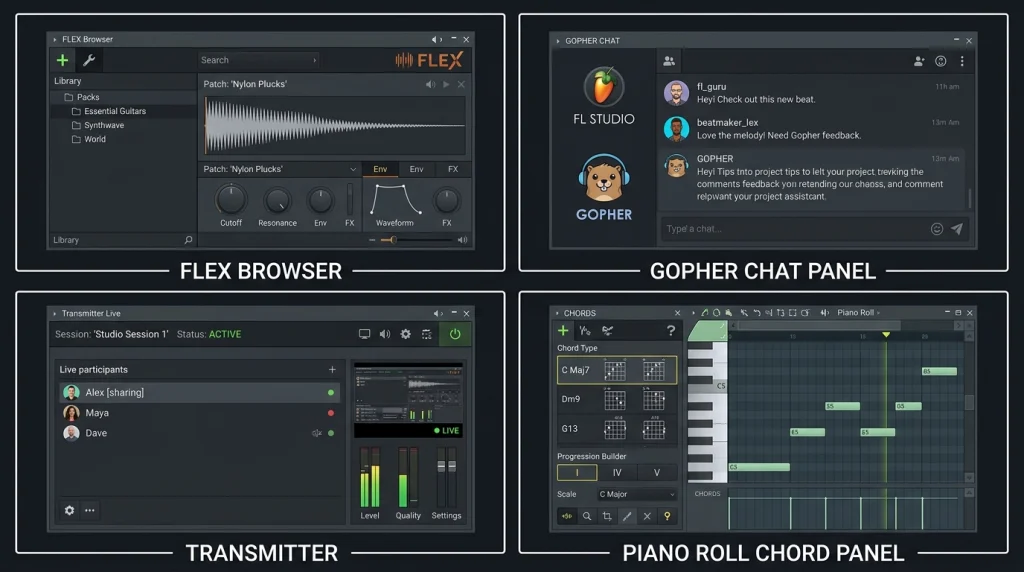
FL Studio 2026 at a Glance: What Changed and Who Gets It
Before we get into the Afrobeat details, let us look at the full picture. Image-Line packed this release with one big synth rebuild, one new effect, smarter AI and a long list of workflow fixes.
Release Date and the Free Update Policy
FL Studio 2026 was released in July 2026 as a free update for everyone who already owns FL Studio. Image-Line still honors its Lifetime Free Updates policy, so if you bought any edition in the past, you pay nothing to upgrade. You can read the full change list on the official FL Studio 2026 release page (Image-Line).
The Headline Features in One Table
| Feature | What It Does | Best Afrobeat Use |
|---|---|---|
| FLEX redesign | Faster engine, new browser, lower CPU | Plucks, pads and bright leads |
| Gopher AI | Organizes, routes and sets levels on request | Session setup and cleanup |
| Transmitter | Splits audio into transient and sustain | Shakers, congas, log drums |
| Chord Panel | Detects chords and suggests new ones | Writing progressions in key |
| Chord Stamp voice leading | Smooth chord movement | Soft keys and guitar-style chords |
| Remix a Song | Detects BPM and separates stems | Remixes and reference study |
| FL Cloud backup | Encrypted project storage | Protecting client beats |
| Luxeverb update | New mode and 100 presets | Vocal and percussion space |
| Audio Logger, Clip Gain, Note Labels | Small workflow helpers | Faster, cleaner sessions |
Which Edition Do You Need?
Most of the new features are in every paid edition. The main exception is Transmitter, which comes with the All Plugins Edition. According to MusicTech’s FL Studio 2026 coverage (MusicTech), UK prices are:
- Fruity Edition: GBP 89
- Producer Edition: GBP 199
- Signature Bundle: GBP 279
- All Plugins Edition: GBP 469
Prices differ by region, so check the Image-Line store in your own currency.
Why This Update Matters for Afrobeat Producers
Afrobeat lives on three things: groove, chords and clean percussion. FL Studio 2026 touches all three. Transmitter shapes percussion, the Chord Panel speeds up harmony, and the new FLEX gives you faster access to the warm, bright sounds the genre loves. That is rare for a single update.
FLEX Redesign: Faster Sound Selection for Afrobeat Leads and Pads
FLEX was always the quick “grab a sound and go” synth in FL Studio. In FL Studio 2026 it got its first major rebuild since 2019.

What Is New in FLEX
- A faster engine that loads presets more quickly and uses less CPU
- A much bigger browser with genre filters, so you can find sounds by style
- More than 200 new presets across 8 free Core Series packs
How to Use FLEX for Afrobeat
Afrobeat melodies often sit on short plucks, mellow keys and airy pads. Here is a quick way to use the new browser:
- Open FLEX on a new channel and use the browser filters to show pluck and keys presets.
- Audition sounds while your drum loop plays, so you hear them in context.
- Pick one bright pluck for the lead and one soft pad for the background.
- Cut the pad’s low end with an EQ so it does not fight the bass.
If you are new to building a full beat, pair this with our step-by-step guide on how to make an Afrobeat in FL Studio.
How to Test It in Your Own Session
Open an older project that uses several FLEX instances and watch the CPU meter before and after updating. Also time how long it takes you to find a usable pluck with the new filters. Those two checks tell you if the update actually speeds up your workflow.
Verdict for Afrobeat Producers
Worth it. Faster preset hunting keeps you in the creative flow, and lower CPU matters when your session has 30 or more percussion channels.
Gopher AI in FL Studio 2026: Your New Session Assistant
Gopher used to answer questions about FL Studio. Now it can act. According to Image-Line, Gopher in FL Studio 2026 can organize tracks, route mixer channels, set levels, adjust plugin settings and even write Piano Roll content and VFX scripts when you ask in plain language.
What Gopher Can Do Now
- Rename, color and group tracks
- Route channels to mixer tracks and buses
- Set starting levels
- Change plugin parameters
- Generate Piano Roll ideas and VFX scripts
Image-Line also says you can talk to Gopher in your own language and that it does not collect your project data.
Afrobeat Prompts to Try
Afrobeat sessions get messy fast because of all the percussion layers. Try requests like these:
- “Color all shaker, conga and bell channels orange and route them to one mixer bus called PERC.”
- “Route the kick and snare to a DRUMS bus and set both around -6 dB.”
- “Create a new pattern with a simple I-vi-IV-V chord progression in A minor.”
Results depend on how clearly you ask, so check what Gopher changed before you move on.
Where Gopher Helps and Where It Does Not
Gopher is great for setup and cleanup, the boring 10 minutes before the fun starts. It is not a replacement for your ears. Let it route and organize, but make your own mix and groove decisions. We cover this balance in more detail in our guide to AI music tools every producer should know.
Verdict for Afrobeat Producers
Useful for busy sessions. If you run big percussion stacks, Gopher can save you real time on routing.
Transmitter: Transient Shaping for Shakers, Congas and Log Drums
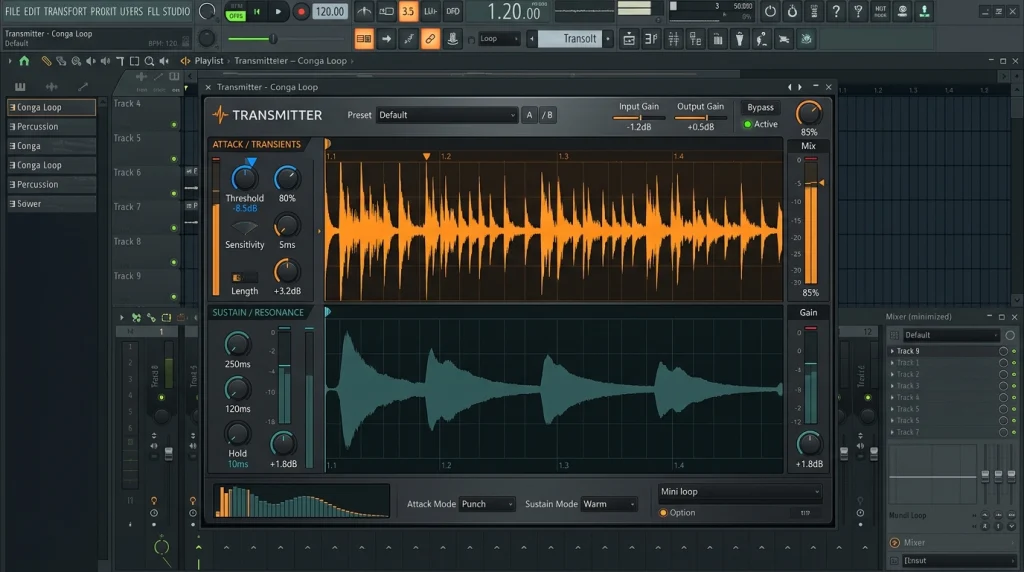
Transmitter is the most exciting new plugin in FL Studio 2026 for anyone who makes percussion-heavy music. It splits any sound into two parts: the transient (the attack) and the sustain (the body and tail). You can then shape or route each part on its own.
Why Transient Control Matters in Afrobeat
Afrobeat grooves come from many small percussion hits working together. When every shaker and conga has a long tail, the groove turns into mush. Shorter tails and sharper attacks make the bounce clearer.
Three Ways to Use Transmitter
- Tighten shakers: Turn down the sustain so each hit is short and crisp.
- Punch up congas: Boost the transient slightly so the conga cuts through the chords.
- Split log drums: Send the transient to one mixer track and the sustain to another. Keep the click clean and add saturation only to the body.
That third trick works well with the ideas in our Amapiano log drums mixing guide, especially for Afrobeat and Amapiano crossover tracks.
Common Mistakes to Avoid
- Boosting transients on every sound, which makes the mix harsh
- Killing the sustain on the kick, which removes its weight
- Forgetting to check the result in mono
Verdict for Afrobeat Producers
The best new tool in this update, if you own the All Plugins Edition. It fixes the “muddy percussion” problem faster than EQ alone.
Chord Panel and Chord Stamp: Afrobeat Harmony Without Guesswork
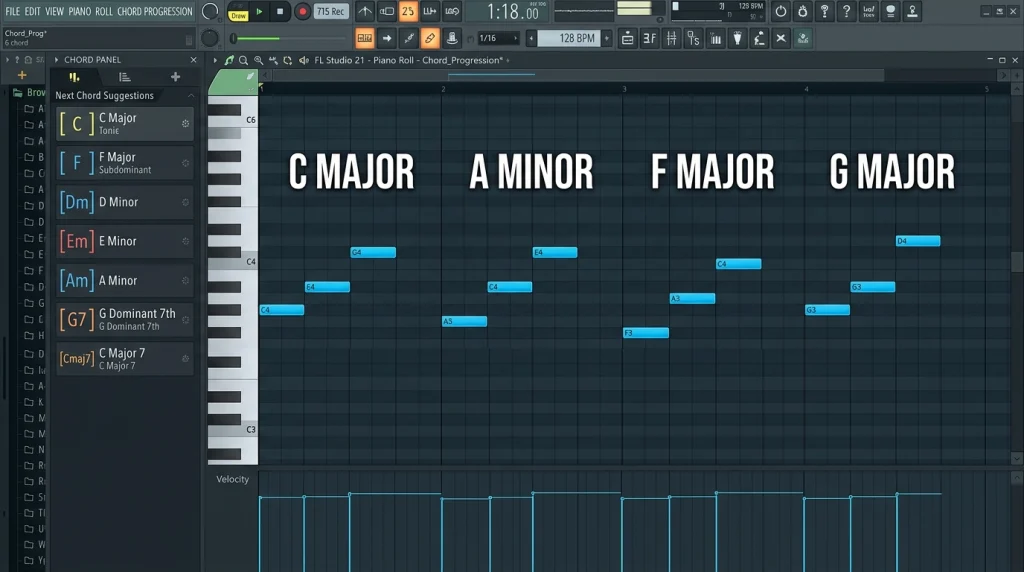
The Piano Roll in FL Studio 2026 got two smart harmony upgrades. The new Chord Panel detects the chords you have written and suggests other chords that fit your key. The updated Chord Stamp tool adds voice-leading modes, so chords move smoothly instead of jumping around.
How Chord Detection Works
Write a few notes in the Piano Roll and the Chord Panel shows you the chord name right away. It then suggests chords that stay in key. For beginners, this is like having a music theory teacher sitting next to you.
Writing an Afrobeat Progression Step by Step
- Set a key, for example A minor or C major.
- Write your first chord, often a minor 7th or major 7th for that smooth Afrobeat feel.
- Use the Chord Panel to pick the next chord from the suggestions.
- Apply Chord Stamp voice leading so the chords glide from one to the next.
- Add a short rhythmic pattern so the chords bounce with the drums.
Want ready-made ideas to start from? Try the progressions in our guide to the best Afrobeat chord progressions for beginners.
Voice Leading: Top-Down vs Bottom-Up
Chord Stamp now offers top-down and bottom-up voice-leading options. Top-down keeps the highest note steady, which works well for melodic keys. Bottom-up keeps the lower notes steady, which suits warm pads under a vocal.
Note Labels for Cleaner Piano Rolls
You can now rename notes in the Piano Roll. Label your hook notes, bass notes or chord tones so you can read a busy pattern at a glance.
Verdict for Afrobeat Producers
A big win for beginners and fast writers. Experienced players will still use their ears, but the suggestions are great for breaking out of the same four chords.
Remix a Song: Stem Separation for Afrobeat Remixes and Study
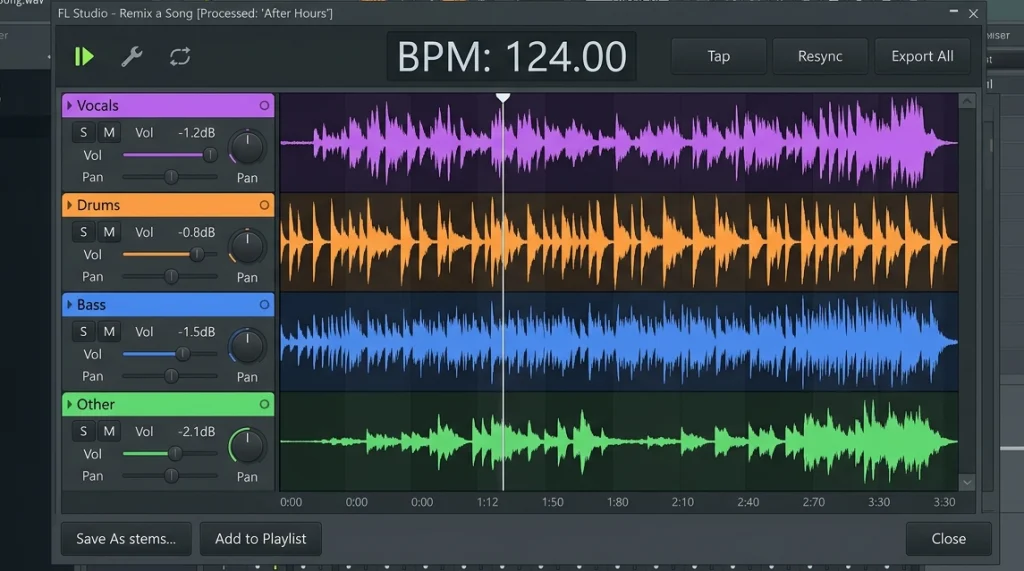
The new Remix a Song tool in FL Studio 2026 detects the tempo of an audio file and splits it into stems. That means you can pull a vocal, drums or bass out of a finished song inside FL Studio.
Creative Uses
- Build an unofficial remix or bootleg for practice
- Pull a vocal to test over your own Afrobeat instrumental
- Isolate the drums of a hit song to study its groove
Learning From Reference Tracks
This is the hidden gem. Take a song you love, separate the drums, and study exactly where the shakers, snares and kicks sit. It is one of the fastest ways to learn Afrobeat drum programming.
Stay Legal
Stem separation does not give you the right to release someone else’s music. If you plan to sell or stream a remix, you need permission from the rights holders. The U.S. Copyright Office (U.S. Copyright Office) explains how copyright protects sound recordings, and our own guide to music licensing breaks down the practical steps.
Verdict for Afrobeat Producers
Great for learning and private remixes. Just keep releases legal.
FL Cloud Backup: Protect Every Beat You Make
Losing a project is every producer’s nightmare. FL Studio 2026 now lets you save projects straight to encrypted cloud storage from inside the DAW.
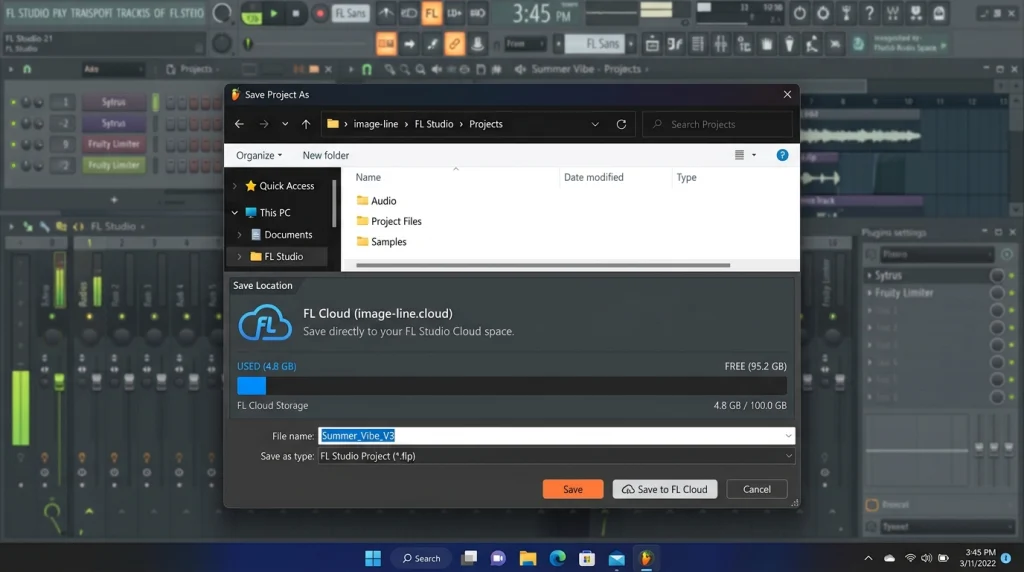
Storage Tiers
- Free: 500 MB
- Plus: 5 GB
- Pro: 1 TB
Privacy
Image-Line says your cloud projects are encrypted and are not used to train AI models. That matters if you store unreleased beats for clients.
Best Practice for Producers
500 MB is enough for project files but not for big sample libraries. Save your projects to FL Cloud and keep your samples backed up on a separate drive.
Verdict for Afrobeat Producers
Turn it on today. The free tier alone protects your most recent work.
Small FL Studio 2026 Workflow Upgrades That Add Up
Not every change in FL Studio 2026 is a headline. These smaller updates quietly save time every day.
Audio Logger: Never Lose a Happy Accident
The Audio Logger keeps the last 60 seconds of your master output. Played an amazing melody while you were not recording? Just grab it from the logger. For producers who jam on a MIDI keyboard, this is a lifesaver.
Audio Clip Gain Controls
You can now set gain directly on audio clips. Level your vocal takes and samples before they hit any compressor, which gives you a cleaner, more even mix.
Luxeverb Update
Luxeverb gets a new feed-forward processing mode and 100 new presets. Try the new presets on background vocals and percussion to add space without washing out the groove.
Full-Size Plugin Artwork
Plugin artwork now shows at full size in the browser, which makes it easier to spot the plugin you want quickly.
Building an Afrobeat Beat in FL Studio 2026: A Full Workflow
Here is how all of these FL Studio 2026 features come together in one session. Follow this order and you will use every major upgrade.
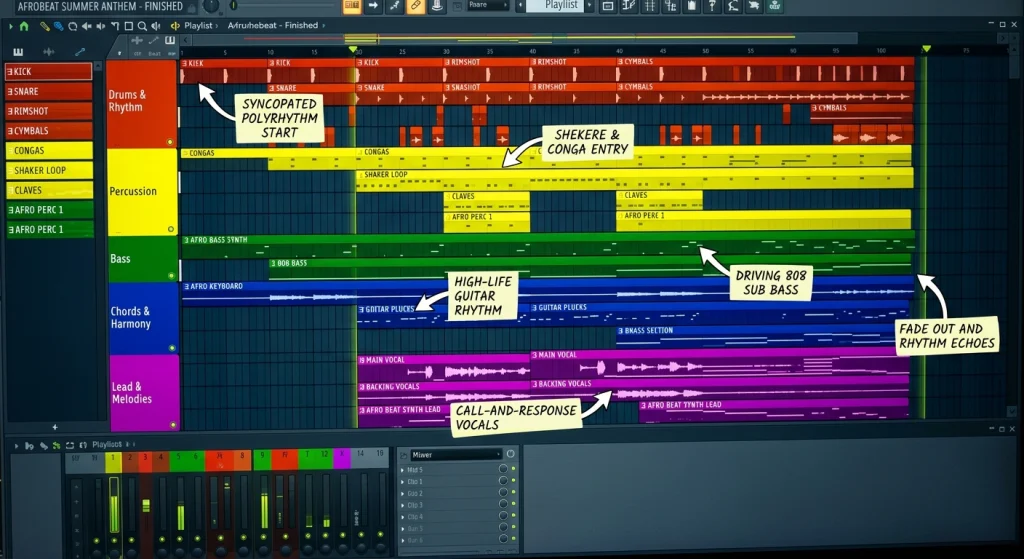
Step 1: Set Up With Gopher
Ask Gopher to create and color your drum, percussion, chord and bass buses. Your session is organized before you play a single note.
Step 2: Write Chords With the Chord Panel
Write a four-chord progression, use the suggestions to try new chords, and apply voice leading so it flows.
Step 3: Add FLEX Sounds
Pick a pluck lead and a soft pad from the new FLEX browser. Keep the pad low in the mix.
Step 4: Program and Shape the Percussion
Build your groove, then use Transmitter to tighten the shakers and punch up the congas. Keep the kick simple and let the percussion carry the bounce.
Step 5: Finish and Back Up
Use clip gain to level any audio, add Luxeverb on the vocal bus and save the project to FL Cloud.
Should You Update to FL Studio 2026?
For most producers, the answer is simple: yes. The update is free for existing owners, and the new tools help with real problems.
Who Benefits Most
- Beginners: The Chord Panel and Gopher remove a lot of early confusion.
- Percussion-heavy producers: Transmitter is a major upgrade for Afrobeat, Amapiano and Afro house.
- Busy beatmakers: Cloud backup and the Audio Logger protect your work.
Before You Update
- Back up your current projects and plugin folders.
- Check that your third-party plugins run correctly in FL Studio 2026.
- Avoid updating in the middle of a client deadline.
Community Feedback
The Image-Line forum (Image-Line Forum) posts every patch and bug report, so check it for known issues before you update a working studio machine.
Our Overall Verdict
FL Studio 2026 is one of the strongest updates for Afrobeat producers in years. Transmitter and the Chord Panel are the standouts, FLEX is faster, and Gopher finally does useful work.
Conclusion: Make FL Studio 2026 Work for Your Sound
FL Studio 2026 is not just a list of new buttons. For Afrobeat producers it brings cleaner percussion, faster chords, quicker sound selection and safer project storage.
Here are the key takeaways:
- Use Transmitter to fix muddy shakers, congas and log drums.
- Let the Chord Panel and voice leading speed up your progressions.
- Hand boring routing jobs to Gopher.
- Turn on FL Cloud backup today.
- Use Remix a Song to study grooves, but release remixes legally.
Now it is your turn. Update to FL Studio 2026, open a fresh project and build one Afrobeat beat using at least three new features this week. Then come back and tell us in the comments which tool changed your workflow the most.
Frequently Asked Questions
Is FL Studio 2026 a free update?
Yes. If you already own any edition of FL Studio, the update is free thanks to Image-Line’s Lifetime Free Updates policy.
Which FL Studio 2026 edition includes the Transmitter plugin?
In FL Studio 2026, Transmitter is included in the All Plugins Edition. Other editions get most of the other new features.
Is FL Studio good for Afrobeat production?
Yes. The fast Piano Roll, step sequencer and pattern workflow suit percussion-heavy genres, and the new chord and transient tools make it even stronger.
Does Gopher AI make beats for you?
No. Gopher can organize your session, route channels, set levels and generate Piano Roll ideas, but the creative decisions are still yours.
Can I release a remix made with Remix a Song?
Only with permission from the rights holders. Stem separation is a creative tool, not a license.
How much free cloud storage do I get?
Every user gets 500 MB of free FL Cloud storage. Paid plans offer 5 GB (Plus) and up to 1 TB (Pro).